K-POS brings together the iPad point of sale, the admin console on the web and the fiscal receipt issued by the certified printer. The catalogue you save in the console reaches the floor the same instant, and when the internet is missing the service carries on as before.
Order taking that does not stop when the network drops
Fiscal receipts and electronic invoicing to the Italian exchange system
Delivery, loyalty, bookings and payments already connected
4
languages on every screen, from the till to the console
5
payment terminals with an adapter already written
4
delivery channels, three direct plus Deliverect
0
network calls needed to open the till
Some of the brands using K-POS
The applications
Three tools, one system
Managers work on the web, floor staff work on the iPad, the kitchen and the counter each get a screen of their own. None of the three asks anyone to type again what another has already written.
Admin console
On the web, from any computer
Catalogue, price lists, rooms, operators, permissions, reports, printers, integrations. Every screen exists in four languages, and every record stays inside the perimeter of the company it belongs to.
Products, modifiers, menus and combos
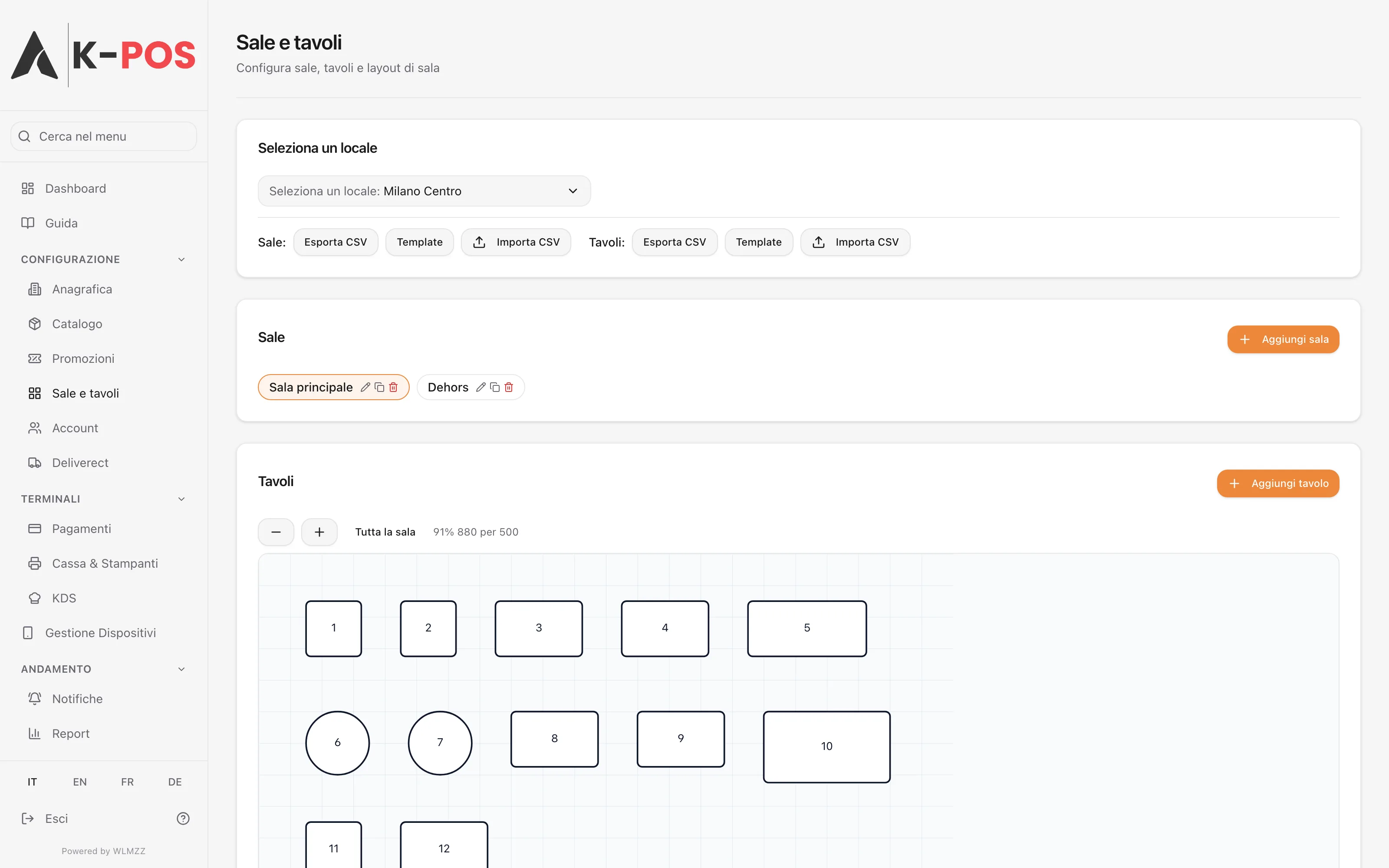
Floor plan with tables you place by dragging them
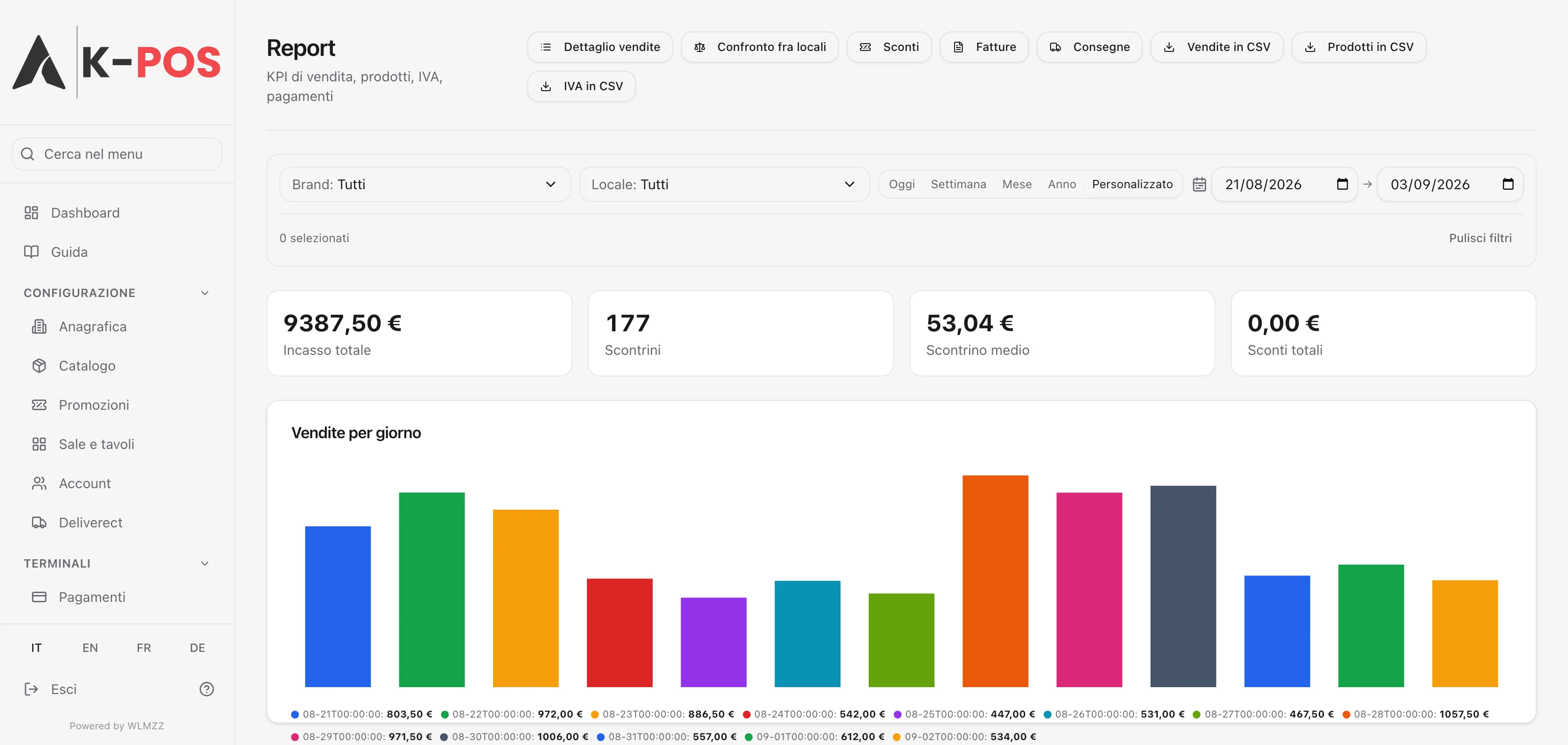
Sales reports with export and comparison across venues
iPad point of sale
On the floor, with or without internet
Opening a table, order taking with search and barcode scanning, required and optional modifiers, courses, seats, merging bills, sending only the new lines to the kitchen.
The catalogue is replicated on the device itself
Every action enters a local queue instead of calling the server
A status bar that always shows line, queue and licence
Service screens
In the kitchen, at the counter, on the table
The kitchen display advances lines in real time. The customer screen shows the bill while it is being rung up. The QR code on the table opens the digital menu, the order and the payment.
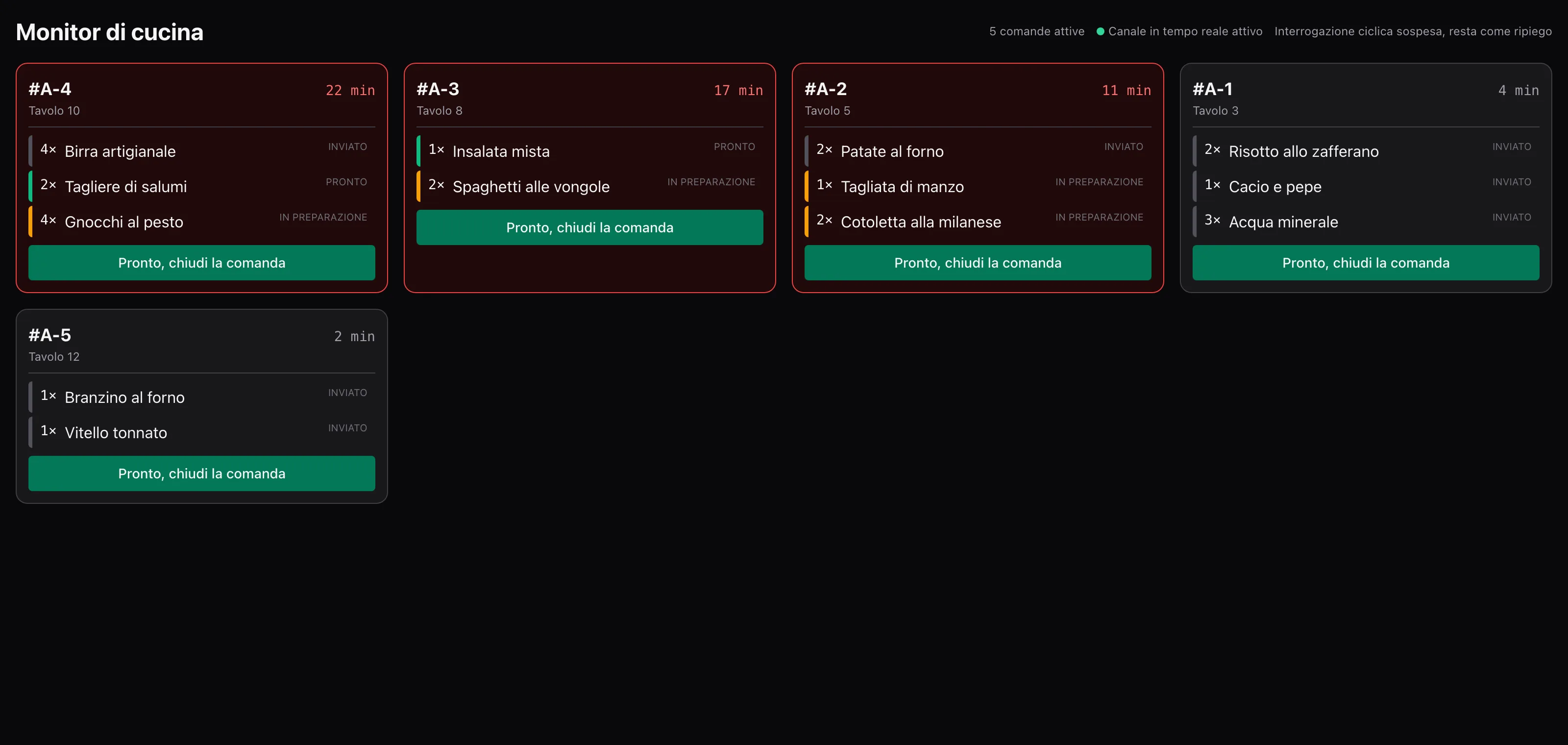
Kitchen display in the browser and inside the app
Customer screen with cart, tip and loyalty balance
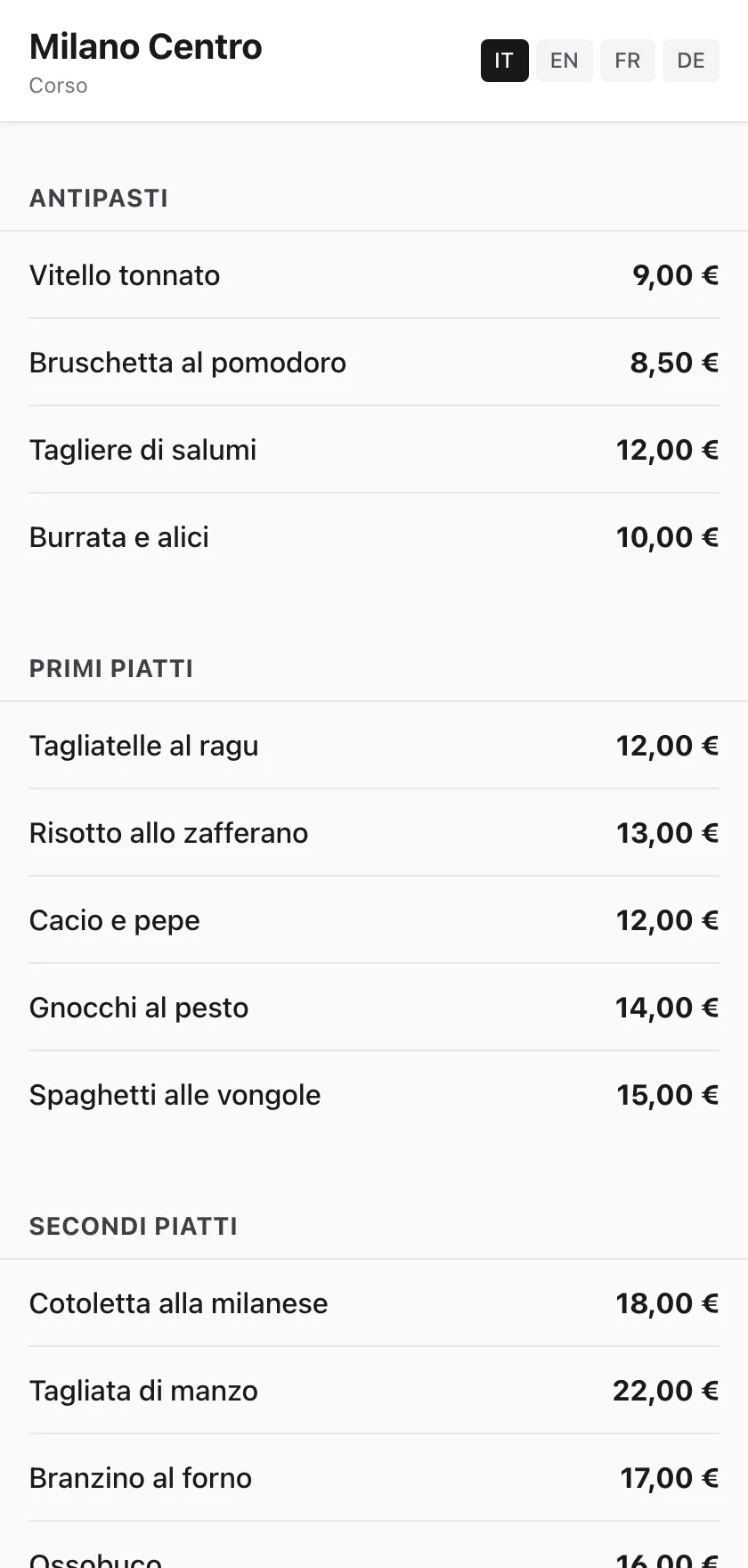
Digital menu with photos, allergens and prices per channel
Screens
This is what it looks like
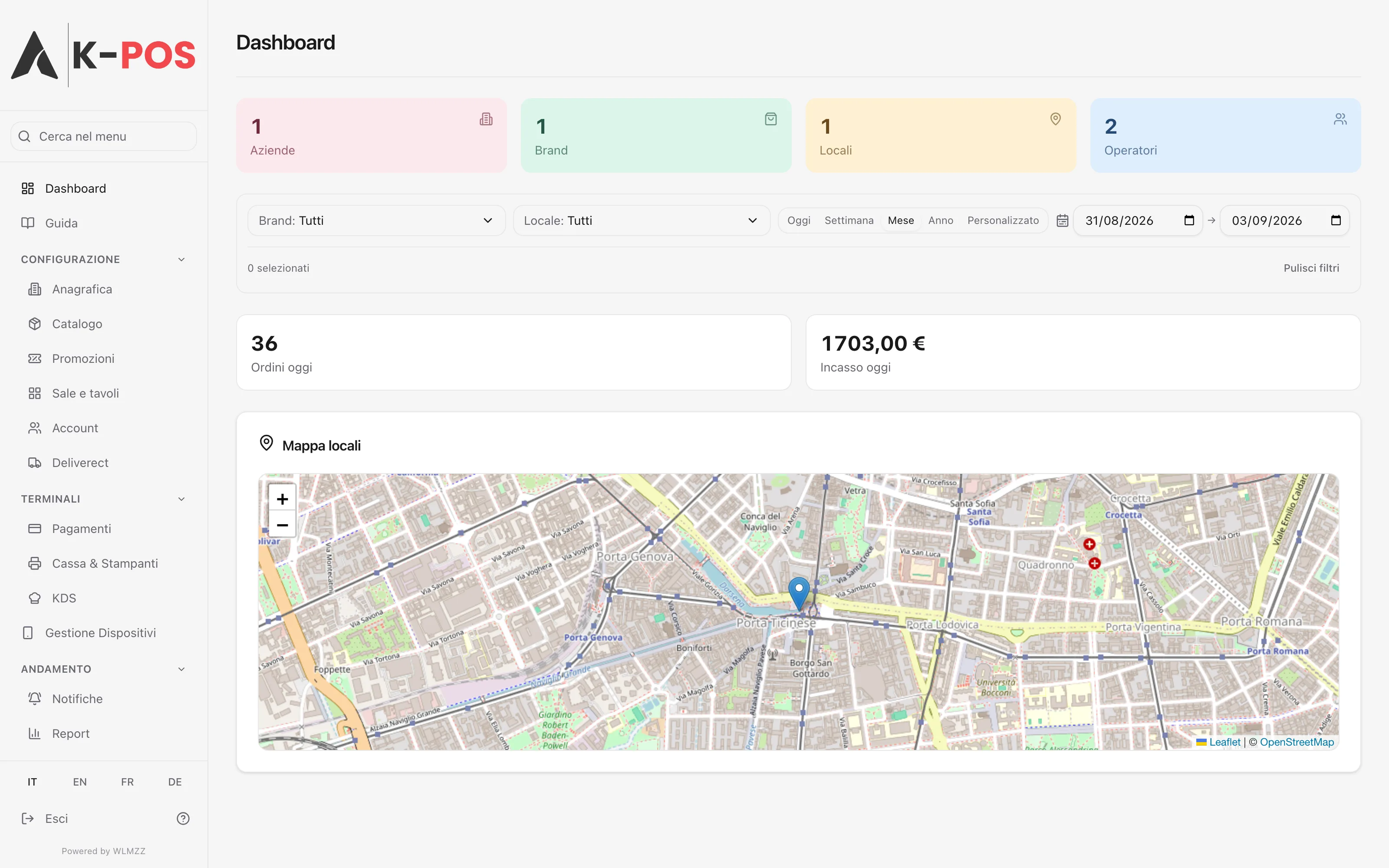
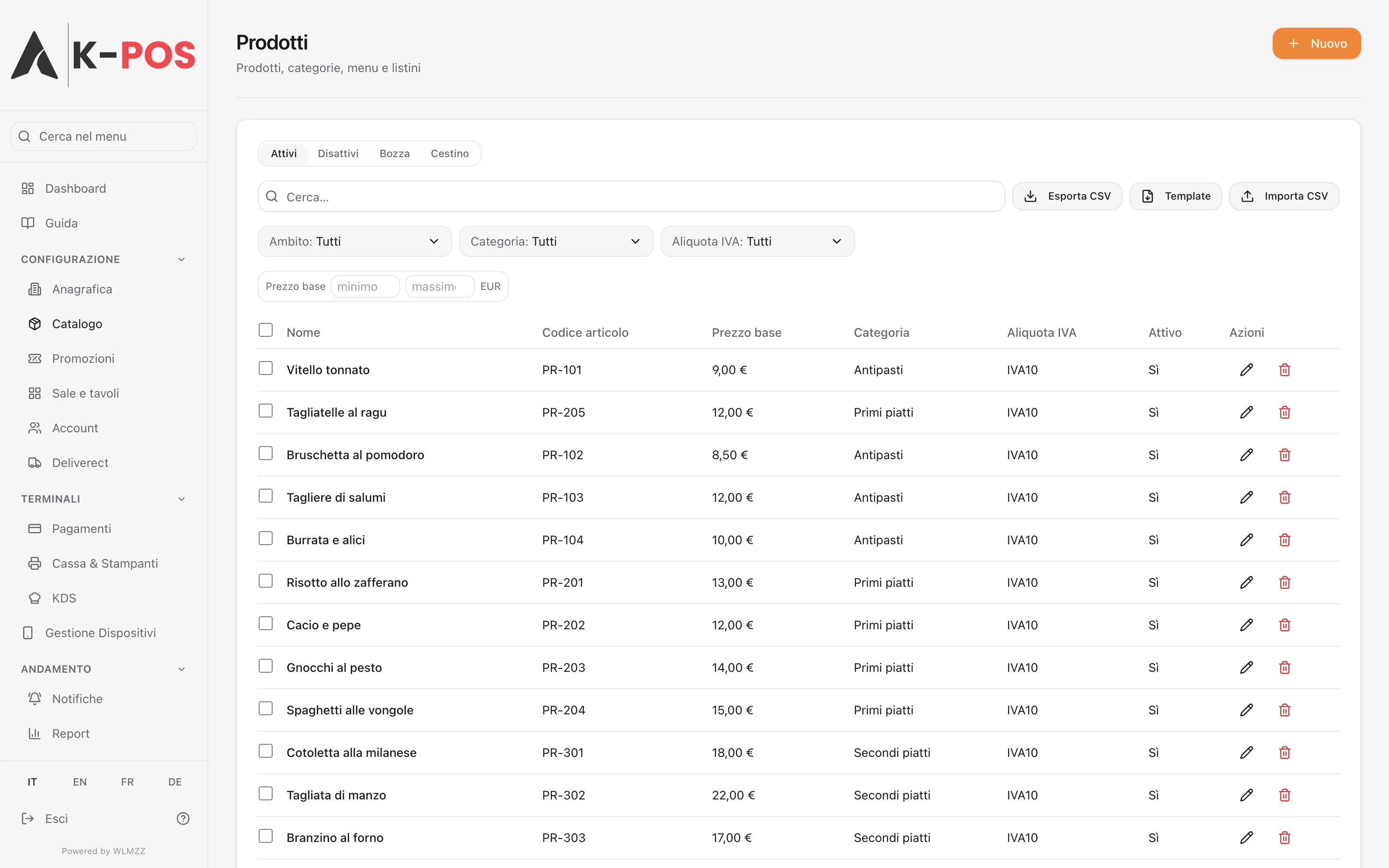
Screens taken from the product while it works. What you see here is what you find the day you sign in.
The picture of the day
Takings, receipts, average receipt and the trend of the venue, with values that move while the service is still going on.
Catalogue and price lists
Products, categories, allergens, tax rates, modifiers. Every name exists in four languages and every price can change per sales channel.
Floor plan
Rooms and tables are placed by dragging them. Shape, seats and state of each table then reach the iPad with no further step.
Sales reports
Sales by period, products, payment methods, tax summary and channels, with a CSV export protected by a permission of its own.
Kitchen display
Orders arrive in real time and advance line by line. It runs in the browser of any screen hanging over the pass.
Digital menu
The QR code on the table opens the menu of the venue, with photos, allergens, channel prices and the language of whoever is reading.
Features
What you can do with K-POS
From opening the first table to closing the day, without switching program.
Catalogue, prices and menus
Categories, allergens, tax rates carrying the department of the fiscal printer, modifier groups with a minimum and a maximum, menus with sections, combos with guided steps. The price of a line is frozen when it is added, so changing a price list tomorrow does not change yesterday receipts.
Floor, orders and kitchen
Floor plan with rooms and tables, opening a bill, notes per line, courses, seats, moving a table, merging bills, transferring lines. Sending resolves routing line by line and prints on the right groups, and a line that no rule routes is never marked as sent.
Payments and shifts
Closing a bill with several methods, change, line and bill discounts, cover charge, service, tips kept outside the taxable total, splitting the bill. Shifts with a float, movements and a closing variance. Five payment terminals already have their adapter, with start, cancel, refund and a signed callback.
Italian fiscal rules
The fiscal receipt is issued by the Epson certified printer reached over the local network, and the backend records it with serial, progressive number and closing number. Refunds and voids require a reference to the original document. Electronic invoices leave towards the exchange system with their own numbering series.
Working without a connection
The internet is an accessory service, not a prerequisite. The catalogue lives on the iPad, printers and the fiscal printer live on the local network, every write goes through a queue with an idempotency key generated exactly once. Local numbering uses a per device prefix, so two iPads without a line cannot produce the same code.
Remote control plane
Everything that changes often lives outside the app binary: configuration cascading over six levels, print documents as templates, routing decided by the server, commands sent to a device, interface strings that can be overridden. Fixing a behaviour on the floor does not mean waiting for an Apple review.
Service continuity
When the line drops, nothing changes
The path without a network is not an emergency mode tested on the side: it is the normal path. Starting the till depends on no call at all, and everything needed to ring up a bill is already on the device.
The catalogue is replicated on board and updates when the line returns
Order printers and the fiscal printer live on the venue network
Takings on the provider terminal stay possible and are reconciled later
An expired licence never prevents closing a bill that is already open
Compliance
Italian fiscal duties covered end to end
The certified printer is the party that transmits to the revenue agency, and K-POS does not stand in the middle: it receives the document already issued and records it, so the paper and the database say the same thing even when the server cannot be reached.
Fiscal receipt on the Epson certified printer over the local network
Refunds and voids bound to the original document
Electronic invoices with their numbering series, towards the exchange system
Fiscal closings and tax summary in the console
Maintenance
Fixing things without going through the store
A defect living inside the code of an iPad application costs a fix, a review and an update on every device. That is why in K-POS almost everything likely to change is declarative data that the already installed code knows how to read.
Configuration cascading over six levels, from the platform down to a single device
Print documents changed without touching the application
Commands sent to a device, and printing on behalf of another one
Telemetry and network quality measured by the iPads themselves
Integrations
It speaks to what the venue already uses
Every connector is written against the vendor specification and tested on its sandbox, not inferred from the documentation.
Delivery and takeaway
Glovo
Just Eat
Deliveroo
Deliverect
Payments
Revolut
SumUp
Satispay
Stripe Terminal
Diebold Nixdorf
Loyalty and vouchers
Bite
TicketOS
Meal vouchers
Connected systems
OneBooking
SupplyONE
PlatformONE
Devices and compliance
Epson certified printer
Network order printers
Italian exchange system
Need other connections? The backend exposes signed outbound webhooks, with repeated attempts, a dead letter queue and a circuit breaker.
Questions
The questions that always come up
Short answers, verified on the product.
Does K-POS work without internet?
Yes. The iPad point of sale keeps the catalogue on board, talks to printers and to the certified fiscal printer over the venue network, and puts every write into a queue that drains when the line returns. Even starting the till depends on no server call.
Which fiscal printer is required?
K-POS issues the fiscal receipt through an Epson FP-81 II RT certified printer reached over the local network. The printer itself transmits takings to the Italian revenue agency, so transmission does not stop when the server is unreachable.
Can I run several venues and several brands?
Yes. The structure has four levels: platform, company, brand, venue. A product can be defined once for the whole company and reused everywhere, or belong to a single brand. Reports compare several venues in the same view.
Which languages are available?
Italian, English, French and German, on every screen of the console and of the till. Venue content too, meaning names and descriptions of products, categories and menus, is stored as one field per language.
How do orders arrive from delivery apps?
Through three direct connectors to Glovo, Just Eat and Deliveroo, and through Deliverect as an alternative. Orders enter the till like any other, menus republish themselves at the scheduled times, and a product that runs out is snoozed on every channel at once.
What is needed to start?
One iPad per station, the certified fiscal printer, the order printers already present in the venue and one licence per point of sale. An existing catalogue is imported from CSV, and the floor plan is set up in the console before the till is even switched on.
Want to see it on your own venue?
Write to us with the number of stations, how many brands and which delivery channels you use. We answer with a demonstration built on your case, not on a sample catalogue.